Free tool

Free self-employed invoice template for individuals

A self-employed invoice template is for billing clients in your own name, without a company: your full name and address, the client's details, an invoice number, the date, the work and its price, the total, the due date and how to pay. Add a tax ID only if you have one. Fill in the template below and download it as a PDF.

2026-007

Your next client invoice

Draft
Save for later

Nothing is saved automatically. Keep your draft file to edit the invoice later.

No signup. Your details stay in this tab. Download a draft before closing it.

Your details

Who is sending the invoice

Client details

Who you are billing

Invoice details

Number, dates and currency

Check the invoice number is unique. Changing currency does not convert your amounts.

Work and charges

The work you delivered

Item 1
Item options (added)

Payment instructions

Make it easy for your client to pay

Add bank details, a UPI ID or a payment link.

Add optional details
Tax and GST

Tax applies after the discount. Confirm tax treatment, service codes and declarations with your accountant. General information, not tax advice. CBIC invoice rules reviewed 30 September 2026. This tool does not issue an e-invoice or invoice registration number.

Reference, notes and signature
PDF previewStudio · A4
Your logo
Your company or name

Your business address

Invoice

2026-007

Issued: 6 Oct 2026

Currency: USD
Bill to
Client company or name

Client billing address

DescriptionQuantityRateAmount

Monthly bookkeeping (up to 150 transactions)

1
month
$450.00$450.00
Subtotal$450.00
Total$450.00
Amount due$450.00
Notes and terms

Payment due within 15 days to the account in my name below.

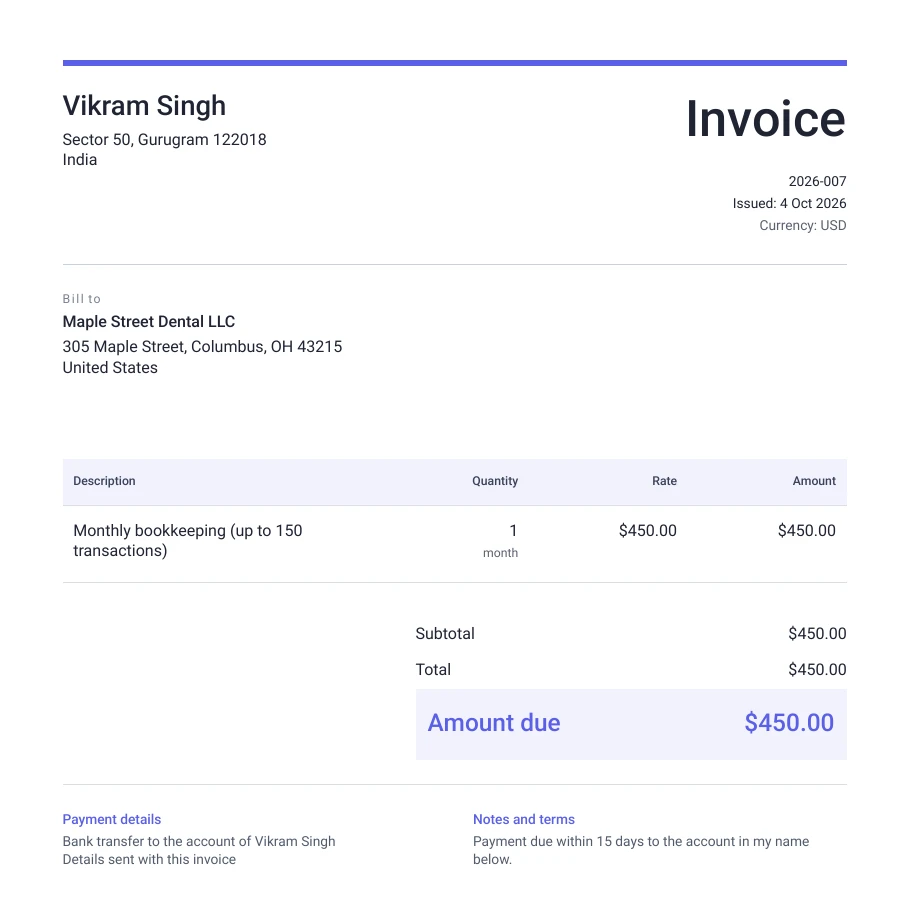
Example of a filled-in self employed invoice, made with the free invoice maker
An example made with the invoice maker above. Your own details replace the sample ones.

Download this self employed invoice template

Prefer to fill it in somewhere else? The same layout, ready to edit.

To open it in Google Docs, upload the Word file to Google Drive and choose Open with Google Docs.

Invoicing in your own name

You do not need a company to send an invoice. Put your full legal name at the top, the same name as on the bank account that will receive the money, so the payment matches your account. If you use a trading name, show it alongside your legal name, such as "Ravi Kumar, trading as RK Design".

Add your address and an email, and leave the logo empty if you do not have one; a clean invoice in your own name looks professional enough for most clients.

Tax IDs: only what you have

If you are registered for GST, add your GSTIN. If you are not, leave the field empty and choose "No tax shown"; nothing else is needed on the invoice for that. Some clients abroad ask for a tax form rather than a number on the invoice, such as a Form W-8BEN for a US company. When you register for GST and bill clients abroad, use the export invoice template instead.

Keeping records for your tax return

Number your invoices in one series, such as 2026-001, 2026-002, and keep every one, with the bank or payment record for the money that came in. Your income from clients is taxed as your income from the work, and these records are what you, or your CA, use to work it out at the end of the year. The GST and income tax guide explains the basics.

Questions people ask

Can I send an invoice without a company?
Yes. Invoice in your own full name, the same as on your bank account. A company is not needed to bill clients.
Do I need a GST number on my invoice?
Only if you are registered for GST. If you are not, leave the GSTIN out and choose "No tax shown".
What invoice number should a self-employed person use?
Any simple series you never repeat, such as 2026-001. Keep every invoice for your records.
Is the self-employed invoice template free?
Yes. No sign-up, no watermark, and nothing you enter leaves your browser.

Last checked on 4 October 2026.