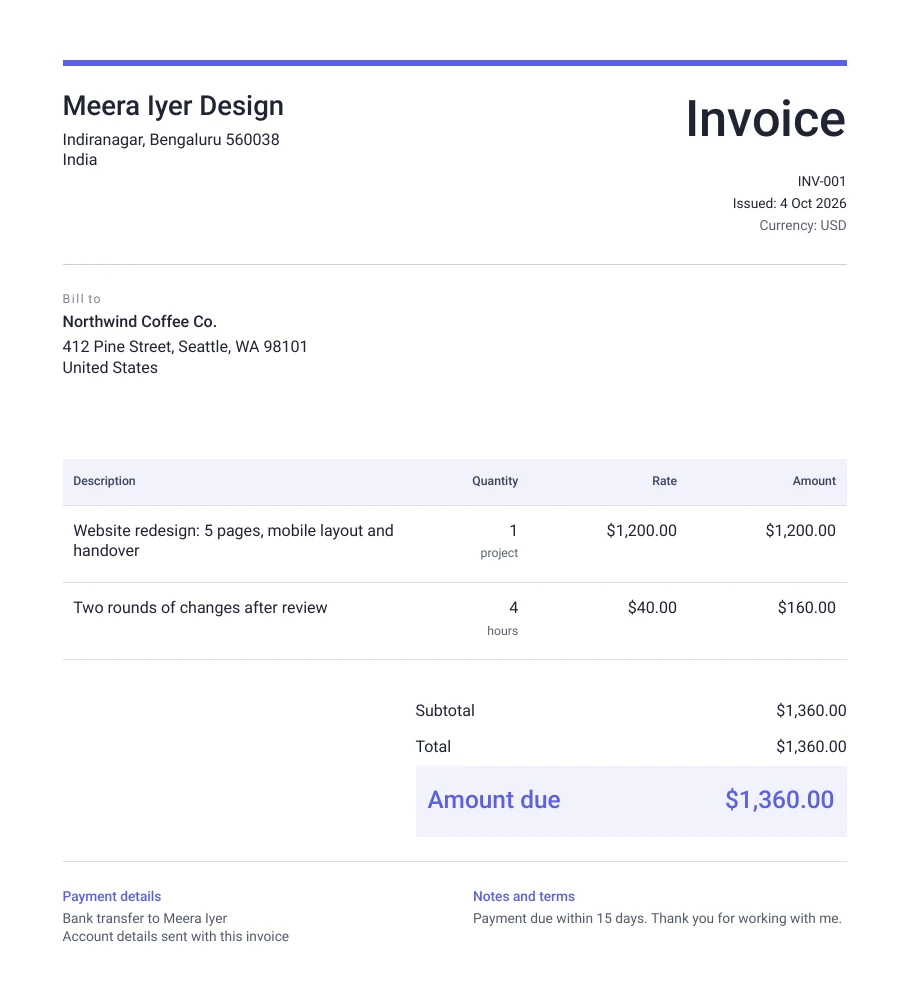
What to put on a freelance invoice
Start with your name or business name, your address and an email the client's accounts team can reply to. Under it, put the client's company name and billing address exactly as their finance team uses it, because that is the name they match against their records.
Give every invoice its own number in one simple series, such as INV-001, INV-002, and never reuse one. Add the date you issue it and the date payment is due, then describe the work in words the client will recognise from your proposal. Finish with the total in the currency the client pays in and the details they need to pay you.
Payment terms you can copy
Payment terms tell the client's accounts team when and how to pay. Put them in the notes, in one or two plain lines. Common ones are: "Payment due within 15 days of the invoice date." "50% due before work starts, 50% on delivery." "Monthly fee, paid in advance on the 1st of each month." "Bank and transfer fees are paid by the sender."
Whatever you choose, use the same terms you agreed in your proposal or contract, so that the invoice is never the first time the client sees them.
How to number your invoices
Use one simple series and never skip or reuse a number, for example INV-001, INV-002, INV-003. Some freelancers add the year, such as 2026-001, which makes it easy to find an invoice later. If you are registered for GST, the number must be unique for the financial year and no longer than 16 characters.
Billing a client abroad
Invoice in the client's currency, usually US dollars, pounds or euros, so that the amount on the invoice is the amount they approve. Say who pays the bank or transfer fees in the notes, so nobody is surprised. If you are registered for GST and export services without paying tax, the invoice needs an export line as well, and the export invoice page below shows it.
Send the invoice the day the work or the milestone is done. Most late payments are an invoice that arrived late or sat in the wrong inbox, so put the due date where it is easy to see.
How to send it
Download the PDF and attach it to an email to the person who approved the work, with the invoice number, amount and due date in the subject line, such as "Invoice INV-004, USD 1,360, due 20 October". Copy in the client's accounts team if they have one. Keep a copy of every invoice you send in one folder, because you will need them for your records and taxes.
Questions people ask
- Is this freelance invoice template free?
- Yes. The template is free, needs no sign-up, and the PDF has no watermark. Everything you type stays in your browser.
- Can I add my logo?
- Yes. Upload your logo in the details panel and it appears at the top of the invoice in every design.
- What currency should I invoice in?
- Use the currency your client pays in, which for clients in the US is US dollars. You can pick from the common currencies in the details panel.
- Should a freelancer put payment terms on the invoice?
- Yes. A due date and a short line such as "Payment due within 15 days" tell the client's accounts team when to pay, and make a polite reminder easier if it is late.
Last checked on 4 October 2026.